This iPhone tip goes out to those of you following the growing “Life Hacks” movement - gaining back precious minutes of your life through efficiency practices.
We’ve all been stuck in meetings that we wish we could get out of. Well, fortunately His Steveness has designed something handy into the iPhone which will help us reclaim our lives so we can get back to doing what we _really_ want to be doing. If you have the foresight, try this before attending your next meeting:From the main menu, select Clock then Timer. Use the wheel interface to set your interval (How much of this meeting are you willing to endure?), set your ringtone and hit “Start.”
Attend your meeting. Go ahead and shut your phone down (read as: Hit the hardware button on top right) and set it on the table next to your notebook, printouts, etc. and act as interested as you can in the meeting. Resist the urge to check the timer - don’t worry, it won’t let you down. When the timer reaches zero, it will wake up your iPhone and play the ringtone. To anyone glancing over at your iPhone, the combination of idle screen wallpaper and ringtone will look convincing, even to a fellow iPhone user.
Grab it shortly into the first ring, give it a quick glance, and apologize to those left in the room.. “Sorry, I gotta take this…”
Add this to digg, del.icio.us, etc.
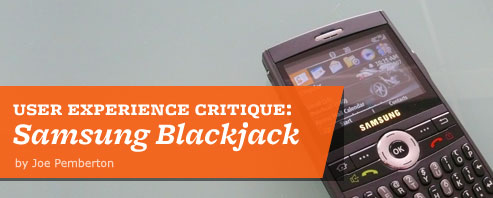
Carrier: AT&T (formerly Cingular)
Manufacturer: Samsung
Platform/OS: Windows Mobile 5
We can’t help the fact that mobile devices are often presented in retail environments with dummy mockups and fake printed screens. But, we can help the dialogue with a focus on the whole user experience and not merely a features and form factor breakdown.
The Blackjack is a conversation starter. It’s small, it’s capable and it’s good looking in a utilitarian kind of way. When people inevitably ask about it and I’m forced to explain my love/hate relationship with it.
For the good, the bad, the ugly, odd and puzzling keep reading after the bump. Continue Reading »
Add this to digg, del.icio.us, etc.

Qualcomm’s annual BREW conference wrapped up in San Diego on Friday. This year saw an unprecedented focus on user experience, with panel and breakout sessions over all 3 days on everything from Understanding Users Through Contextual Inquiry to User Centered Design for Mobile Environments and Designing and Evaluating Mobile User Interfaces. Qualcomm also sponsored quick-hit 30-minute sessions where attendees had the opportunity for Q&A in a more informal environment.
Although some sessions were introductory in nature, several assumed a degree of knowledge about user centered design in general and its application to the mobile space in particular. This leads me to think that BREW is attracting a more diverse audience that is increasingly aware of the importance of a user centered approach to mobile interfaces and seeking out information to this end. This is a good thing for anyone who uses a mobile phone, which is to say, pretty much everyone.
Add this to digg, del.icio.us, etc.
A couple of insightful posts have surfaced about Nokia’s worldwide research. The first on BBC News is an interview with Jan Chipchase, Nokia Design’s principal researcher. I first heard Chipchase talk about his work at the DUX 2005 conference in San Francisco. I came away knowing he has, hands down, the coolest job around.
Continue Reading »
Add this to digg, del.icio.us, etc.
Officials in India are using ringtones of moos and bleats to lure and trap leopards. Apparently “forest guards” have found ringtones are safer and more cost effective than luring the cats with live cows and goats for bait. Read the Reuters story>.
(Thanks Laine Fast for the link.)
Add this to digg, del.icio.us, etc.
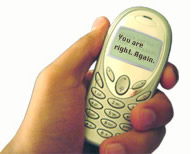

Fiona Carswell, a graduate of the Interactive Telecommunications Program at New York University, has the answer to your text message doldrums.
“CELL STICKIES: For people who go to great lengths to see what they want to see, Cell Stickies is a small booklet of translucent sheets with comforting messages printed on them. Not satisfied with the text message you received? Peel off a Cell Sticky and slap it on your cellphone screen, showing you the message you really wanted to see.”
Add this to digg, del.icio.us, etc.
 MEX CONFERENCE, LONDON — Paul Kompfner, Head of Development for ERTICO spoke in response to the following MEX manifesto point:
“The world is gaining embedded intelligence. The mobile industry faces a fundamental user experience challenge to make handsets as effective as communicating with the environment as they are with other humans. We think the connection of millions of machines to wireless communication networks represents the most significant generational change since the introduction of packet data.”
Imagine this: As you approach your vehicle, technology in your mobile phone interfaces with the car. It authenticates and unlocks for you. The seats, mirrors, radio stations adjust to your presets as you settle into the vehicle.
You start the car without need for a key. Your media in your device syncs with the larger capacity and capability of the vehicle. As you rocket down the highway listening to a favorite podcast, a call comes in. The volume reduces and you’re able to press a key on your steering wheel to take the call, never having had to take your eyes off the road.
Suddenly carrying around a device in our hand feels only mildly mobile. How does a user’s needs change when moving down a highway at 100mph? The automobile is the next frontier for the mobile user experience. Getting the experience right can mean the difference between life and death.
Continue Reading »
Add this to digg, del.icio.us, etc.
 MEX CONFERENCE, LONDON — Antti Ohrling, co-founder of Blyk kicked off the second day of the MEX conference with his views on understanding the importance of user experience in delivering mobile advertising. Ohrling’s core belief is that mobile advertising is successful only if it is relevant and contextual: the consumer must see it as a benefit, rather than a distraction.
Ohrling used his presentation to discredit 3 commonly held myths about advertising in the mobile context, based on his experience with Blyk and on customer surveys Blyk has recently conducted. First he pointed out that the target audience for mobile advertising is a 19-year-old male, 80% of whom are paying their own monthly mobile phone bill.
Myth #1: Content is King
By this Ohrling means the use of content as a platform to delivery advertising. A January 2007 survey of 619 mobile phone users aged 16 to 24 year-old asked them what they do most with their mobile phones:
- Voice
- Text
- Alarm clock
73% do not use mobile data services. 2/3 said they use mobile data services once a month or less, which in essence means that they don’t use it at all. Tying a mobile advertising campaign to WAP-based content that requires the consumer to access via the browser on their device is thus not a sound decision.
Continue Reading »
Add this to digg, del.icio.us, etc.
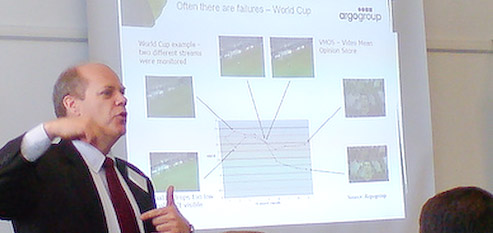
MEX CONFERENCE, LONDON — Paul Nerger, Vice President of Worldwide Sales & Marketing at Argogroup, spoke in response to the following manifesto point:
“User experience performance must be measured if it is to be improved. It must be constantly tracked through quantitative and qualitative methods. We think organizations throughout the value chain are failing to recognize the importance of understanding customers because quantifying the return on investment is too difficult”.
Paul started his talk by illustrating Argogroup’s services through case studies. One highlighted a “false event”, a momentary spike in service that results in temporary failures. Typical SMS-based false events include New Year Eve and the Super Bowl. So many people send New Year’s greetings to their family and friends at the stroke of midnight or to trash talk during the last few minutes of the Super Bowl that service spikes, resulting in high levels of data usage. When these patterns are not anticipated by carrier’s operations centers performance of the SMS service is drastically impacted, with message delivery unreasonably delayed. In some instances messages are not delivered at all.
Continue Reading »
Add this to digg, del.icio.us, etc.
MEX CONFERENCE, LONDON — The second session of the first day of the MEX conference examined the evolution of community services and social networking in the mobile environment. This session was in a panel format, meaning that following the speaker, discussion took place among subject matter “experts” invited to weigh in on the topic. I was fortunate to be one of the members of this panel, along with Frederick Ghahramani of AirG, Neil Cox of the CMO Council and Antonio Vince Staybil of GoFresh and itsmy.com.
Although only a very small percentage of Vodafone’s subscribers use its mobile internet and content services, Al pointed out that that represents about 4 million users. He expects these numbers to grow as the range of content offered on the mobile internet grows and becomes easier to access via mobile devices.
Al was candid in his talk about the challenges Vodafone has faced in translating a community experience from one context, that of the fixed or PC-based internet, to mobile. He astutely reasoned that a literal translation won’t be succesful and that only those aspects of the PC experience that are meaningful in the mobile context should constitute the mobile experience.
Continue Reading »
Add this to digg, del.icio.us, etc.